
Changelog
What's new.
Every Device MCP release, newest first, with the day it came out. To go back to an earlier version, download its build below.
Bug fixes and improvements.
Bug fixes and improvements.
- Report bugs from the new Bug button in the sidebar, with screenshots, videos and diagnostics, or as a GitHub issue.
- Wi-Fi mirroring keeps working when the Mac loses track of a device, with crash reports, battery and storage too.
- On slow Wi-Fi, the mirror switches to standard quality, tells you why, and returns to high quality when it can.
- Logs now survive a relaunch, and logs and diagnostics leave out your email, device names and other personal details.
- Agents type more reliably over Wi-Fi and on non-Latin keyboards, and check that the field shows the text.
- Agents handle alerts in 13 more languages, stop scrolling right at the element they find, and hide any keyboard.
- AirPods keep playing while the iPhone is mirrored.
- Clicks land where you aim them on the 12.9-inch iPad Pro, in portrait and landscape.
- Storage shows the space actually free on the device, not space iOS might clear later.
- Fixed a crash on every agent request on some Macs running macOS 27.
- The Settings pane waits for the mirror to start instead of showing a "not connected yet" error.
- Small touches: the inspector keeps its width across tabs, and the connection guide asks for a USB cable.
- A new Settings tab in the inspector changes appearance, text size, accessibility options, location and sound, as in Xcode.
- Play a GPX route to move a device's location, on iPhones, iPads, simulators and Android emulators.
- Agents can now manage devices and your license, and always ask you before unpairing or removing a license.
- Agents can report a bug by opening a filled-in GitHub issue, personal details removed, for you to review.
- Duplicate, wipe or delete a shut-down Android emulator from its menu in the sidebar.
- Android emulators now mirror smoothly at 60 frames per second.
- Emulators started from Android Studio or a script restart once by themselves, so they mirror smoothly too.
- Rotate turns the whole device with an animation, a quarter turn left per click; the Device menu turns either way.
- Rotate now works when the screen stays upright, like the Home Screen, and turns Lock Rotation off for you.
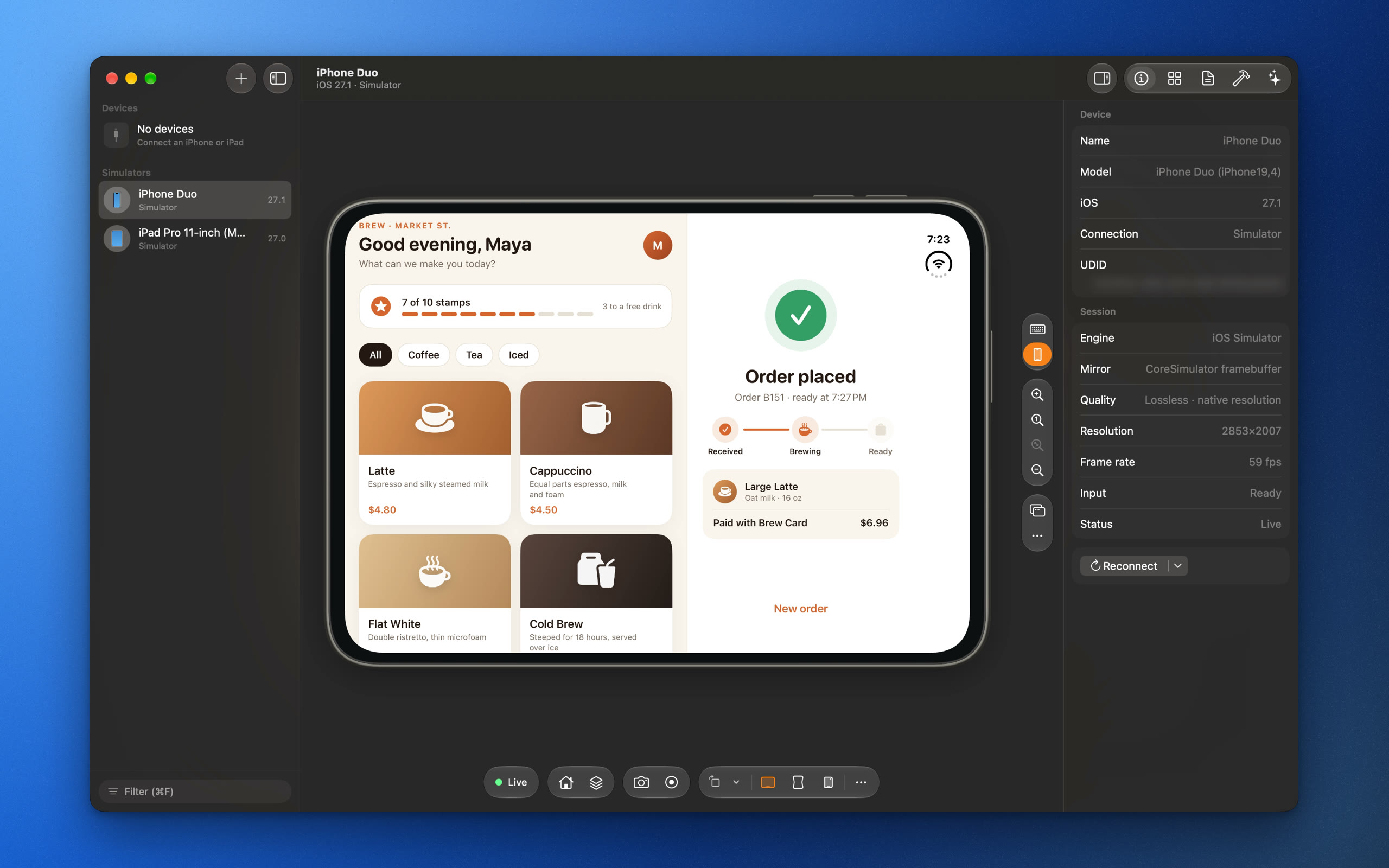
- iPhone Duo mirrors the screen that's on, follows the fold, and fills the frame without black borders.
- Screenshots show a "Screenshot Saved" banner with Open in Finder, and now play the shutter sound.
- Unpair and Shut Down sit beside Reconnect in the Info pane; Show Device Frame moved to Settings and the View menu.
- Android Studio emulators now work like iPhones and Simulators: start, mirror and control them, in the app and from agents.
- Agents can scroll an exact distance and swipe without the screen flinging past where they aimed.
- The app icon now has dark, clear and tinted versions.
- Device MCP no longer opens every time you start Claude Code or Codex, only when an agent uses a device.
- Agents find devices by the name you say, even when the real name has an emoji or curly apostrophe.
- Agents can tell when the Home Screen is showing instead of an app.
- A new agent skill shows Claude Code and Codex how to use Device MCP well.
- Zoomed in, the device now scrolls under the toolbar and controls, so you can see all of it.
- Clicks land in the right place right after rotating, and agents wait for a rotation over Wi-Fi to finish.
- Agents can now open Settings pages on iOS Simulators.
- The Dynamic Island in device frames now sits exactly where iOS draws it.
- The recording time stays on one line, plus small visual touches in the sidebar.
- Set up Codex with one command: codex mcp add
- MCP is free: Device MCP Free runs the MCP server, and agents get every tool except build_and_run and install_app (Pro)
- An MCP button under the mirror: turn the server on, copy the Claude Code or Codex setup, open Agent Activity
- type_text waits for a tap to show before its first key, so fields such as Safari's address bar no longer drop characters
- Simulator screens fit their device frames, and the mirror's shadow falls below the device
- Fix three regressions since 0.2.2: simulator fallback, guide waits, Unpair flash
- Install the Developer Disk Image when a device has no display service
- Camera stays black after mirroring; readable error when the camera blocks mirroring
- Connection guide: iPhone ─ USB ─ this Mac, with a Developer Mode checklist
- iOS Simulator support: list, start, mirror and drive simulators, in the app and over MCP
- MCP: fill, batch_commands, save_screenshot, get_foreground_app, launch options
- Fix the blank Privacy pane, relaunch 1 s after Factory Reset, ⌘F for the device filter
- Crash reports (Sentry) and anonymous usage analytics, in Settings › Privacy
- Verify the license with the server at every launch
The first public release. See and control your iPhone or iPad from your Mac, and let coding agents such as Claude Code and Codex test your app on it.
- Mirror and control an iPhone or iPad on iOS or iPadOS 27, over USB or Wi-Fi, with your mouse, trackpad and keyboard. Nothing to install on the device: trust this Mac and turn on Developer Mode.
- Sharp, smooth mirroring at up to 60 fps, inside a drawing of your device with clickable side buttons.
- An MCP server for coding agents (Pro): agents see the screen, read the accessibility tree, tap, type and swipe, launch apps, take screenshots and record.
- Build & Run (Pro): build an iOS app from source, then install and launch it on the device.
- Apps, crash reports and app data for each device, as in Xcode's Device Hub.
- Hand-off to you (Pro): a notification and a sound when the device needs Face ID, Touch ID or its passcode.
- Free mirrors and controls one device at a time, with screenshots and recording. Pro adds unlimited devices, the MCP server and Build & Run.
Requires macOS 26 and an iPhone or iPad on iOS or iPadOS 27.
Device MCP 0.1.1
- Faster reconnects after a device is unplugged.
- Screen recording from the toolbar and over MCP.
Device MCP 0.1.0
First release: mirror, control, MCP server, build & run, human handoff.