
Comparison · Nov 3, 2026 · 5 min read
The Xcode Device Hub alternative built for AI agents
Xcode's Device Hub mirrors your iPhone, but AI agents can't use it, it only gets better when Xcode does, and it has no Android. Device MCP does more.
By The Device MCP team
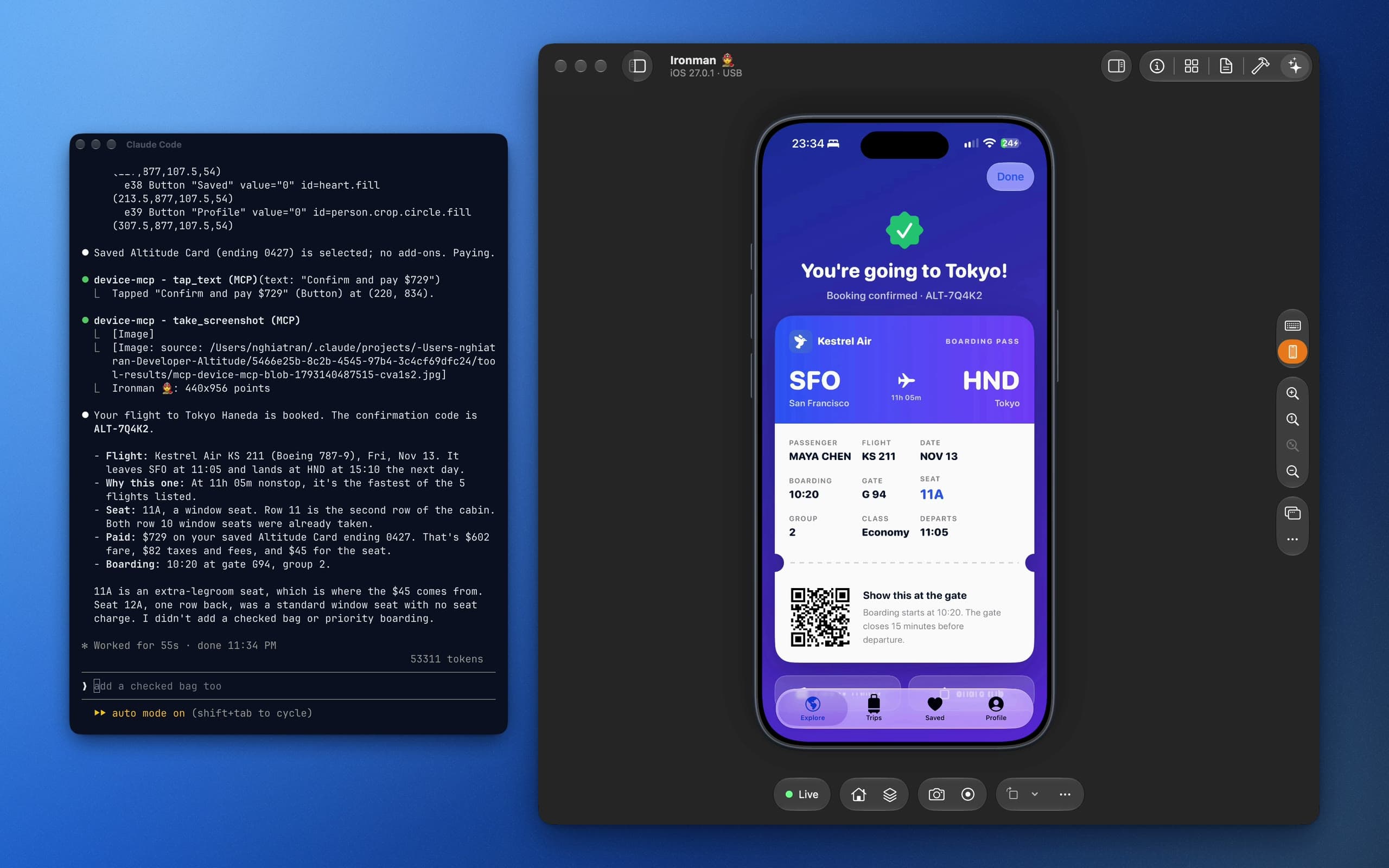
iOS 27 lets a Mac show an iPhone's screen and send it real touches. Xcode's Device Hub was the first app to use it, and it's a good start. But if you work with AI coding agents, or ship your app on more than one platform, you hit its limits fast.
Here's what Device Hub can't do, and why Device MCP is the Device Hub alternative we built to fix it.
The short version
- No MCP. Device Hub has no MCP server, so Claude Code, Codex and other agents can't see or tap your iPhone.
- Stuck inside Xcode. Device Hub only gets new features and fixes when a new Xcode ships.
- No Android. Device Hub is for Apple devices only.
- Device MCP is a Mac app with a built-in MCP server, a sharper mirror and frequent updates, with Android on the way. It's made by the team behind Proxyman.
What is Xcode's Device Hub?
Device Hub is the part of Xcode that shows a connected iPhone or iPad on your Mac.
- It mirrors iPhones and iPads on iOS 27.
- You can tap, swipe and type with your mouse and keyboard.
- It's free and comes with Xcode.
For a quick look at a device, that's enough. For everything else, it falls short.
4 problems with Device Hub
1. No MCP, so your AI agent can't use the device
Coding agents can write your SwiftUI view and run the build. Then they stop. To check their work, they need to use the app, and Device Hub gives them no way in. Without an MCP server, an agent can't:
- take a screenshot of the device
- read the text and buttons on screen
- tap, type or swipe
- open your app and test a flow from start to end
So you become the agent's hands: pick up the phone, tap through, report back. Every time.
2. It ships with Xcode, so it moves slowly
Device Hub is not its own app. It's a feature of Xcode, and that has a cost:
- New features and bug fixes wait for the next Xcode release.
- You have to open Xcode, a very large app, just to see your phone.
- A bug you hit today can stay with you for months.
3. No Android
Device Hub only knows Apple devices. If your team ships on iOS and Android, you need a second tool, and your agent needs a second setup, for the other half of your app.
4. A softer picture
Device Hub asks iOS for its screen-sharing stream: at most 6 Mbit/s, with reduced colour (4:2:0). Small text and moving content get blurry. We explain why in How Device MCP gets a sharper mirror than Device Hub.
Device MCP: a better Device Hub alternative
Device MCP is a native Mac app. It mirrors and controls your iPhone and iPad like Device Hub does, then adds everything Device Hub is missing.
An MCP server for your AI agent
- Works with Claude Code, Codex, Cursor, Gemini CLI, VS Code and any MCP client.
- Your agent can take screenshots, read the screen, tap a button by its name, type, swipe, launch apps, open links and record the screen.
- Build & Run: the agent builds your Xcode project, installs it on the device, then taps through to test what it built.
- You stay in charge. Installs, deletes and builds ask you first, and every call shows up in the activity log.
- Face ID or a passcode? The agent stops, Device MCP sends you a notification, and waits until you're done.
Add it to Claude Code with one command:
claude mcp add --scope user device-mcp -- "/Applications/Device MCP.app/Contents/MacOS/device-mcp"
See the MCP guide for Codex, Cursor and other agents.
Its own app, with fast updates
Device MCP doesn't wait for Xcode.
- Six releases in our first week, including iOS Simulator support. See the changelog.
- Updates arrive on their own, as small, signed downloads.
- You don't need Xcode open to mirror or control a device. Xcode is only needed for Build & Run and simulators.
- Native and light: built with SwiftUI and Metal, with the video decoded in hardware.
Android is coming
- Android devices and Android emulators are coming to Device MCP.
- Same app, same MCP tools: test the iOS and Android versions of your app side by side.
- Device MCP updates itself, so you get it the day it ships. Read more about Android devices and Android emulators.
A sharper mirror
- iOS's Remote Desktop stream: full-colour HEVC 4:4:4, up to 60 Mbit/s and 60 frames a second.
- USB or Wi-Fi, switching on its own when you unplug.
- A live 3D model of your exact device around the mirror. Click a side button to press it.
- Many devices at once, each in its own window.
Built by the Proxyman team
Device MCP is new. The team behind it isn't.
- Made by Proxyman LLC, the team behind Proxyman, Tiny Shield and TCP Viewer.
- 6+ years of building developer tools for the Mac.
- 800,000+ developers use our apps.
- Proxyman LLC is SOC 2 Type II audited for security and privacy.
- Private by design: the MCP server runs on your Mac, on localhost, behind a token. Your screen never leaves the room.
Device MCP vs Device Hub
| Device MCP | Xcode Device Hub | |
|---|---|---|
| Mirror and control iPhone and iPad | Yes | Yes |
| MCP server for AI agents | Yes | No |
| Agents build and run your app | Yes | No |
| Alerts you for Face ID and passcodes | Yes | No |
| Stream quality | Up to 60 Mbit/s, 4:4:4 | Up to 6 Mbit/s, 4:2:0 |
| Android | Coming soon | No |
| Updates | Often, on its own | With Xcode releases |
| Where it lives | Its own Mac app | Inside Xcode |
| Price | Free to mirror, Pro is a one-time purchase | Free with Xcode |
FAQ
Does Xcode's Device Hub support MCP?
No. Device Hub has no MCP server, so AI agents can't see or control a device through it. Device MCP has one built in.
Can I use Device MCP and Device Hub together?
Yes, just not on the same device at the same time. A device can be mirrored by one app at a time. If Device Hub starts mirroring, Device MCP pauses, and Reconnect takes it back.
Is Device MCP free?
Mirroring and controlling one device is free, forever. Device MCP Pro adds AI agents, Build & Run, unlimited devices and the human handoff. You pay once, with no subscription. See pricing.
What do I need?
A Mac on macOS 26 or later and an iPhone or iPad on iOS 27 with Developer Mode on. There's nothing to install on the phone.
Try the Device Hub alternative
Download Device MCP, plug in your iPhone, and give your AI agent a real device to test on.