
Announcement · Nov 4, 2026 · 5 min read
Device MCP now drives Android emulators
Device MCP 0.5.0 mirrors and controls Android Studio emulators, and gives your AI agent the same MCP tools on Android as on iPhone. Here's what it can do.
By The Device MCP team
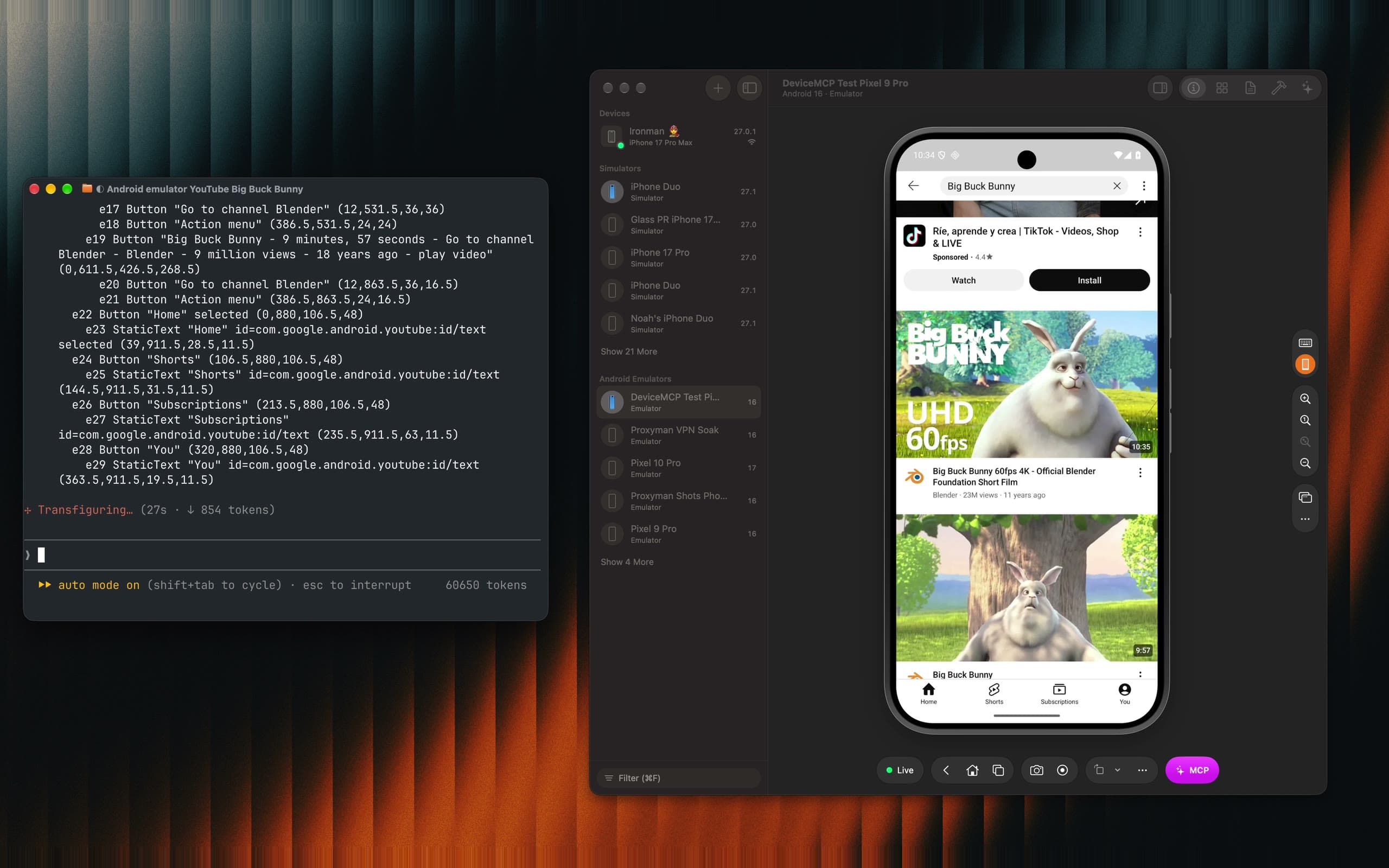
Most apps ship twice: once for iPhone, once for Android. Until today, Device MCP gave your AI agent half of them. Claude Code could build your iOS app, tap through it and tell you what broke. Then someone still had to open the Android version and do it all again by hand.
Device MCP 0.5.0 adds Android emulators. The emulators you made in Android Studio now sit in Device MCP's sidebar, next to your iPhones and iOS Simulators. You can mirror them and control them with your mouse and keyboard, and your agent gets the same MCP tools it already uses on iPhone.
What you get
- Your emulators in the sidebar. Every emulator you made in Android Studio is listed under Android Emulators. Pick one and press Start.
- The same mirror and controls. Click, drag, scroll and type on the mirror. Back, Home and Recents are in the toolbar.
- The same MCP server. No second setup and no second tool. If Device MCP is already in Claude Code or Codex, your agent can use an emulator right now.
- Free to mirror. Device MCP Free mirrors one device at a time, and an emulator counts as one.
One prompt, one emulator
The video above starts with one prompt in Claude Code. Here's how it begins:
On the Android emulator: open YouTube and search for "Big Buck Bunny". Play the first real video (skip Shorts and sponsored results).
Nothing in it says how. Claude Code works it out with the tools it already knows:
list_devicesfinds the running emulator, a Pixel 9 Pro on Android 16.launch_appopens YouTube by its package name,com.google.android.youtube.batch_commandstaps the search field, types the title and takes a screenshot, in one call.- The screenshot shows a sponsored result first, so the agent scrolls past it.
list_elementsreads what's below: every button with its label, position and resource id. tapopens the real video, and a last screenshot confirms it's playing.
The agent never looks for an Android-only trick. It sees the screen, acts and checks, the same loop it runs on an iPhone.
Same tools, Android words
Device MCP maps its tools onto Android, so what your agent knows from iPhone carries over:
| Tool | On an Android emulator |
|---|---|
launch_app, terminate_app | Apps go by their package name, such as com.android.settings |
go_back | Presses Android's Back button |
press_button lock | The power button |
press_button siri | The assistant |
system_gesture | app_switcher opens Recents, control_center Quick Settings, notification_center the notifications |
install_app | Takes an .apk |
list_crashes, get_crash | Read Android's crash log |
start_simulator, shut_down_simulator | Start and stop an emulator by its name |
Coordinates are in dp on Android, the way they're in points on iPhone, so a tap the agent reads off a screenshot lands where it aimed.
What you can do with it
Check both versions of a feature
Your team built the same screen twice. Ask for both at once:
I changed the checkout screen in both apps. Open it on my iPhone and on the Pixel 9 emulator, and tell me where they differ.
The agent takes screenshots on each device, reads the text on both, and lists what's missing or different: a button label, a price format, a step one platform skips.
Reproduce an Android crash
The app crashes when I rotate the player. Reproduce it on the emulator and tell me why.
The agent opens the player, calls rotate, and when the app goes away it reads the crash with list_crashes and get_crash: the exception and the stack trace, straight from Android's crash log.
Walk one flow on many screens
Emulators cost nothing. Make a small phone, a big phone and a tablet in Android Studio, maybe one on an older Android version, then:
Start each of my Android emulators in turn and go through sign-up on each one. Take a screenshot of anything that's cut off.
start_simulator starts each emulator by name and waits until it's up. You get one report instead of an afternoon of clicking.
Smoke-test a build from CI
Point the agent at the .apk your CI built. It installs it with install_app, launches it and runs through the main screens, the way it does with an .ipa on an iPhone. Installing still asks you first, like every risky action.
Check languages and dark mode
Open my app on the emulator in German and in dark mode, and tell me what's cut off.
launch_app starts the app in another language, and set_appearance switches Android to dark mode. The agent reads every screen it visits and lists the labels that don't fit.
What's different from an iPhone
A few things work differently on an emulator:
- No Build & Run.
build_and_runbuilds Xcode projects. For Android, build with Gradle as you do today (your agent can run./gradlew assembleDebugin your terminal), then install the.apk. - No Face ID or passcode. An emulator doesn't ask, so there's nothing to hand over to you.
- Android Studio is the source. Device MCP starts the emulators Android Studio made. Create new ones in Android Studio's Device Manager.
- Emulators outlive the app. Quitting Device MCP leaves the emulators it started running in the background. Shut one down from the sidebar when you're done.
The full details are in the Android Emulator docs.
Next: Android phones and tablets
Emulators are the first half. Real Android phones and tablets are next, with the same mirror, the same controls and the same MCP tools. Device MCP updates itself, so you'll get them the day they ship. Tell us which devices you test on.
Try it
Download Device MCP, or choose Device MCP → Check for Updates… if you have it. Start an emulator from the sidebar, then add Device MCP to Claude Code with one command:
claude mcp add --scope user device-mcp -- "/Applications/Device MCP.app/Contents/MacOS/device-mcp"
Then ask your agent to open your app on the emulator. See the MCP guide for Codex, Cursor and other agents.