
Engineering · Nov 4, 2026 · 5 min read
Android emulators now mirror at 60 fps
Device MCP now shows every frame an Android emulator draws, at 60 fps. Here's why emulator mirrors used to stutter, what we measured, and what changed.
By The Device MCP team
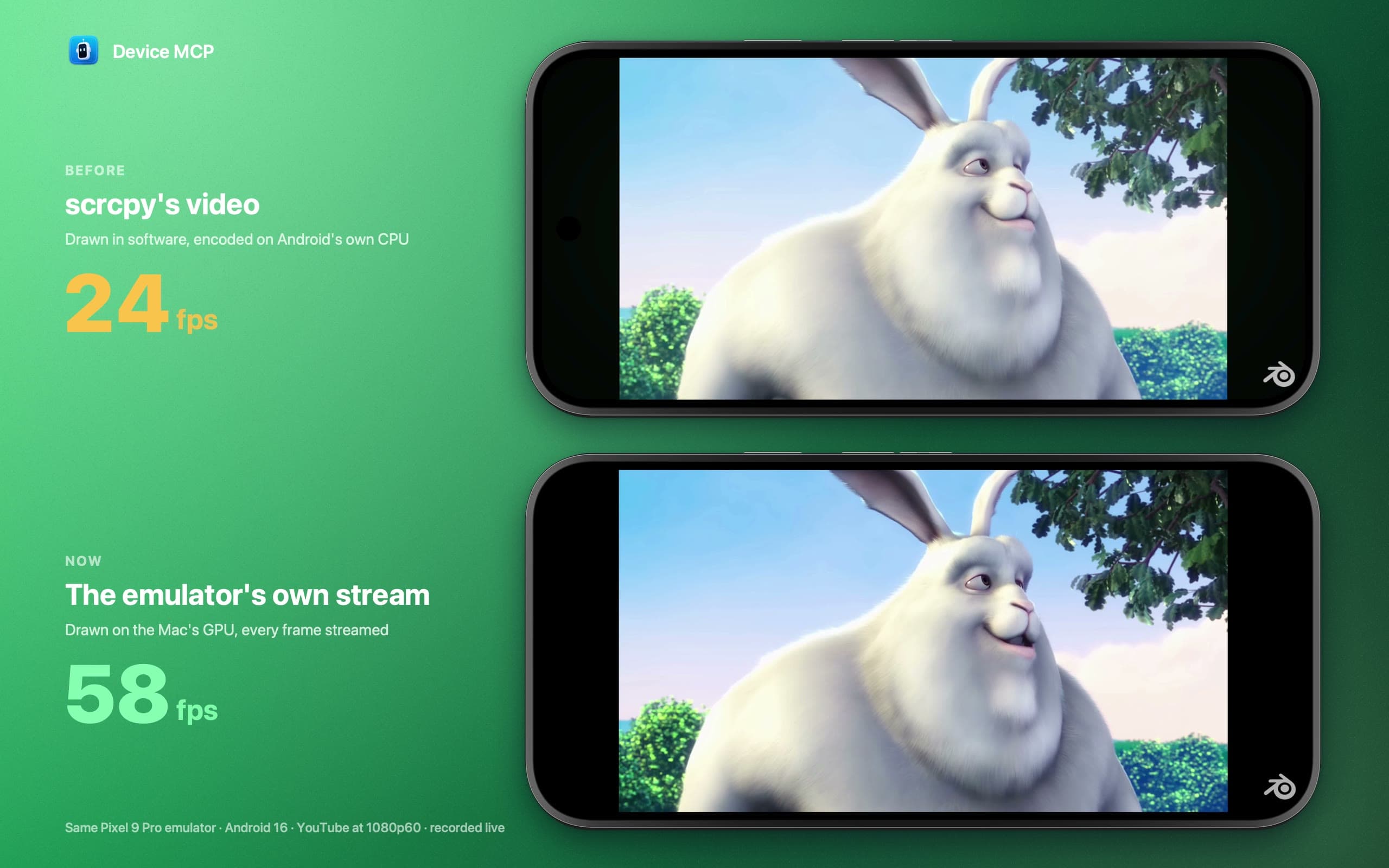
When Device MCP added Android emulators, iPhones and iOS Simulators already mirrored at 60 fps. Emulators didn't. Scrolling looked choppy, video stuttered, and a busy screen could fall to 10 fps.
Android emulators now mirror at 60 fps. Device MCP shows every frame the emulator draws, drawn on your Mac's GPU. Here's the same YouTube video on the same emulator, before and now:
The numbers in the video aren't typed in. They count the new pictures in each recording, second by second.
What we measured
One Pixel 9 Pro emulator on Android 16, playing Big Buck Bunny full screen in YouTube at 1080p60, on a MacBook Pro with an M5 Max. For each setup we read two numbers: how often Android itself put a new frame of the video on screen (SurfaceFlinger's own timestamps), and how many new pictures reached the Mac.
| Setup | Android draws | You see |
|---|---|---|
| Device MCP before: emulator without a window, scrcpy's H.264 video | ~44 fps | ~23 fps |
| Android Studio's default for Android 16 (Automatic graphics) | ~45 fps | ~45 fps |
| Device MCP now: the Mac's GPU, the emulator's own stream | 60 fps | 60 fps |
Video is a fair test, but not the hardest one. A page that redraws the whole screen, such as a canvas animation, drew at only 10 to 15 fps in the software setups. That's where the "10 fps" reports came from.
Two things held the old mirror back: how the emulator drew, and how its picture got to the Mac.
Problem one: drawing in software
An Android emulator can draw with your Mac's GPU or in software, on the CPU. Device MCP used to start emulators with -no-window, because its mirror was the emulator's window. Without a window of its own, the emulator picks a software renderer: SwiftShader or Lavapipe.
Android 16 makes it worse. On a Mac, the emulator's Automatic graphics setting chooses software for Android 16 images too ("API level 36 requires GLES 3.1"). So an emulator you start from Android Studio with the default settings also draws in software. That's fine for most screens, but a full-screen video or animation takes every core it can get.
Problem two: encoding inside Android
Device MCP used scrcpy to see the screen. scrcpy is excellent on a real phone: it runs inside Android, captures the display and encodes it to H.264 with the phone's hardware video encoder.
An emulator has no hardware encoder. scrcpy falls back to Android's software encoder, which runs on the emulator's own virtual CPUs, the same CPUs that are drawing the app you're watching. In the test above, the encoder used more CPU than anything else in the emulator, and the mirror got about half of the frames Android drew. Turning on the GPU didn't help: scrcpy then has to copy each frame back from the GPU before encoding it, and the mirror fell to 3 to 5 fps.
The fix: the emulator's own screen
The Android emulator already has a fast way out. It runs a gRPC service on your Mac, and one of its calls, streamScreenshot, sends each new frame of the screen as plain RGB pixels, the moment the emulator draws it. That's how Android Studio shows emulators in its Running Devices window.
Device MCP now does the same:
- It reads the emulator's frames directly. Nothing is encoded or decoded. Device MCP finds the emulator's service in the discovery file every emulator writes, converts each frame to the Mac's pixel format and puts it on screen. A Pixel 9 Pro frame is 11 MB, so 60 of them a second is about 660 MB/s. That's a lot for a network, but nothing for one Mac talking to itself.
- It starts emulators with a hidden window, on the GPU. Device MCP now runs
emulator -avd <name> -qt-hide-window -gpu host -grpc-use-token, the flags Android Studio uses for its embedded emulators, plus hardware graphics. If you set an AVD to Software in Android Studio, Device MCP respects that. - scrcpy stays, for input only. Its server still sends your clicks, keys, text and clipboard, with its video turned off. Touches land exactly where they did before.
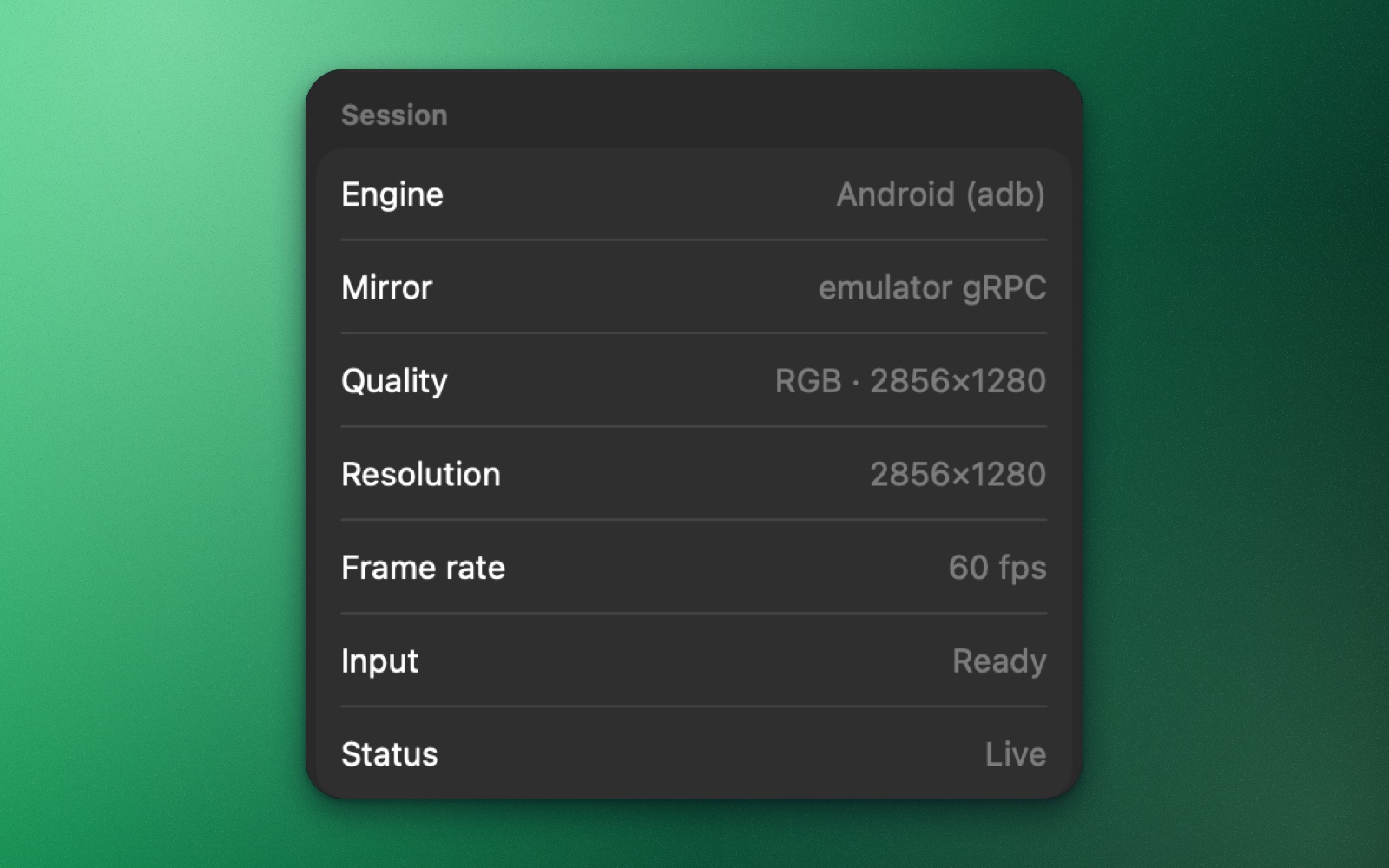
The Inspector shows which path a mirror uses. For an emulator, Mirror now reads emulator gRPC, and Quality shows the full panel in RGB:
Emulators you started somewhere else
There's nothing to change. When Device MCP is about to mirror an emulator that can't stream at 60 fps (one Android Studio started in software, or a script started with -no-window), it starts that emulator again the fast way, by itself. The boot screen shows for 15 to 20 seconds, and an agent's MCP call waits until it's back. It happens once per emulator each time Device MCP runs.
A few things to know:
- The first restart is a cold boot. A Quick Boot snapshot saved while drawing in software doesn't load on the GPU, so whatever app was open closes. Your installed apps and their data stay. Later restarts keep their snapshot.
- It ends a debug session. If Android Studio was running or debugging your app on that emulator, that session stops when Device MCP restarts it. Android Studio's Running Devices window picks the emulator up again by itself.
- Your own flags win. An emulator started with options Device MCP wouldn't pass, such as
-writable-system,-http-proxy,-portor a software-gpu, is left exactly as it is. It mirrors at whatever speed it can.
What it means for agents
Your agent's screenshots come from Android itself, as before. But Device MCP also reads the mirror's picture when an agent asks what's on screen and the accessibility tree can't say, for example in a game or a web view. It recognizes the text in the picture. That picture is now the full 2856×1280 panel, uncompressed, instead of an H.264 frame scaled down to 2048 pixels, so small text comes out cleaner.
How we measured
The video is two recordings of Device MCP's window, made one after the other with the same emulator, the same YouTube video and the same quality setting, then lined up on the film's scene cuts. The emulator's stream only sends a frame when the screen changes, so every update counts as a new picture. scrcpy's decoder also shows frames that barely differ from the one before, so for the old path we only count frames that visibly change. The screen recorder itself catches 57 or 58 of every 60 frames, which is why the video's counter stops just short of 60. The "Android draws" column comes from SurfaceFlinger's frame timestamps, and Android Studio's numbers from reading the same stream its Running Devices window reads. Your numbers will differ with your Mac, the AVD and what's on screen, but the gap holds.
Try it
Update Device MCP, start an emulator from the sidebar, and play something that moves.
Big Buck Bunny © copyright 2008, Blender Foundation, peach.blender.org, licensed under CC BY 3.0.
What's next
- DocsAndroid EmulatorStart, mirror and control Android Studio emulators in Device MCP, and let your AI agent test your Android app on them with the same MCP tools.
- DocsMCPConnect Claude Code, Codex, Cursor or any MCP client to Device MCP, so your AI agent can see, tap, type and test on your iPhone and iPad.
- DocsAndroid DeviceComing soonMirror and control Android phones and tablets from your Mac, and let AI agents test on them. Coming soon.
Device MCP is made by Proxyman LLC, the team behind  Proxyman,
 Tiny Shield and
 TCP Viewer.